
上一篇routing模块(5)-全局路线的生成 文章已经解释了,全局路线计算的流程,并且也介绍了planning接收的逻辑.
从这篇开始,将介绍参考线的生成,并且从本篇开始,尽量忽略流程相关代码解析,只专注算法部分,目的就是让初学者快速理解轨迹规划的基本流程.
CreateRouteSegments函数
GetRouteSegments函数
bool LaneFollowMap::GetRouteSegments(
    const VehicleState& vehicle_state,
    std::list<hdmap::RouteSegments>* const route_segments) {
  double look_forward_distance =
      LookForwardDistance(vehicle_state.linear_velocity());
  double look_backward_distance = FLAGS_look_backward_distance;
  return GetRouteSegments(vehicle_state, look_backward_distance,
                          look_forward_distance, route_segments);
}
vehicle_state:是自车当前的车辆状态数据
route_segments:我们想要获取的数据出参,这一章会介绍它所代表的具体含义
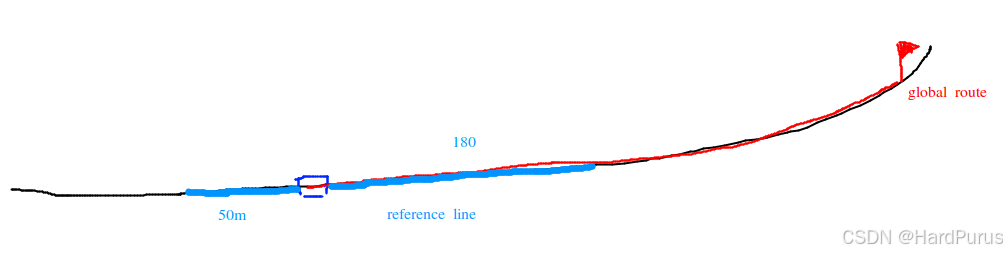
首先,我们应该清楚,参考线是局部的,它是基于全局路线并结合自车当前位置,生成的自车前后一段距离的粗糙轨迹.
LookForwardDistance函数
主要是根据当前车速计算我们要生成自车前方多少米的参考线
FLAGS_look_forward_time_sec:默认是8s
FLAGS_look_forward_short_distance:默认是180m
FLAGS_look_forward_long_distance:默认是250m
double PncMapBase::LookForwardDistance(const double velocity) {
  auto forward_distance = velocity * FLAGS_look_forward_time_sec;

  return forward_distance > FLAGS_look_forward_short_distance
             ? FLAGS_look_forward_long_distance
             : FLAGS_look_forward_short_distance;
}
生成自车后方look_backward_distance米的参考线
FLAGS_look_backward_distance:默认是50m
GetRouteSegments函数
bool LaneFollowMap::GetRouteSegments(
    const VehicleState& vehicle_state,
    std::list<hdmap::RouteSegments>* const route_segments)
vehicle_state:是自车当前的车辆状态数据
backward_length:自车后方需要生成参考线的长度
forward_length:自车前方需要生成参考线的长度
route_segments:出参
UpdateVehicleState函数
GetNearestPointFromRouting函数
bool LaneFollowMap::GetNearestPointFromRouting(
    const common::VehicleState& state, hdmap::LaneWaypoint* waypoint)
vehicle_state:是自车当前的车辆状态数据
waypoint:是自车当前位置,在全局路线上所匹配到的点的数据信息
全局路线是基于道路中心线计算出来的,自车一般是以后轴中心为做坐标原点,所以自车所停的位置后轴中心,大多数都是不在全局路线上的,所以我们要
bool LaneFollowMap::UpdatePlanningCommand(
    const planning::PlanningCommand& command) {
  if (!CanProcess(command)) {
    AERROR << "Command cannot be processed by LaneFollowMap!";
    return false;
  }
  if (!PncMapBase::UpdatePlanningCommand(command)) {
    return false;
  }
  const auto& routing = command.lane_follow_command();
  range_lane_ids_.clear();
  route_indices_.clear();
  all_lane_ids_.clear();
  for (int road_index = 0; road_index < routing.road_size(); ++road_index) {
    const auto& road_segment = routing.road(road_index);
    for (int passage_index = 0; passage_index < road_segment.passage_size();
         ++passage_index) {
      const auto& passage = road_segment.passage(passage_index);
      for (int lane_index = 0; lane_index < passage.segment_size();
           ++lane_index) {
        all_lane_ids_.insert(passage.segment(lane_index).id());
在全局路线上找到一个点,把这个点作为自车的当前位置
  for (auto lane_id : all_lane_ids_) {
    hdmap::Id id = hdmap::MakeMapId(lane_id);
    auto lane = hdmap_->GetLaneById(id);
    if (nullptr != lane) {
      valid_lanes.emplace_back(lane);
    }
  }
all_lane_ids_:就是下面每一个节点的lane id,它是在UpdatePlanningCommand函数中构建的
modules/planning/pnc_map/lane_follow_map/lane_follow_map.cc
bool LaneFollowMap::UpdatePlanningCommand(
    const planning::PlanningCommand& command) {
  if (!CanProcess(command)) {
    AERROR << "Command cannot be processed by LaneFollowMap!";
    return false;
  }
  if (!PncMapBase::UpdatePlanningCommand(command)) {
    return false;
  }
  const auto& routing = command.lane_follow_command();
  range_lane_ids_.clear();
  route_indices_.clear();
  all_lane_ids_.clear();
  for (int road_index = 0; road_index < routing.road_size(); ++road_index) {
    const auto& road_segment = routing.road(road_index);
    for (int passage_index = 0; passage_index < road_segment.passage_size();
         ++passage_index) {
      const auto& passage = road_segment.passage(passage_index);
      for (int lane_index = 0; lane_index < passage.segment_size();
           ++lane_index) {
        all_lane_ids_.insert(passage.segment(lane_index).id());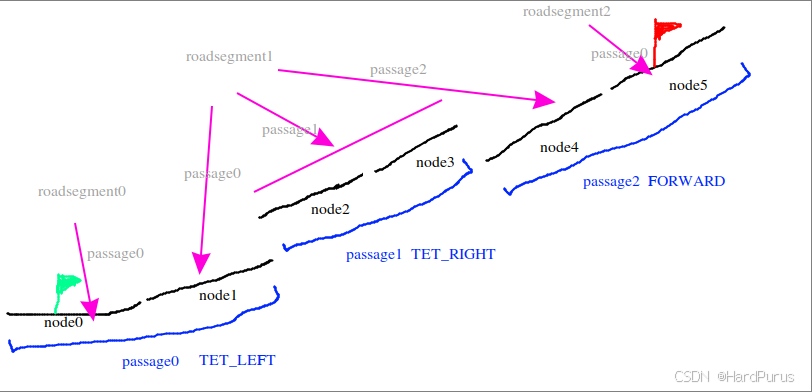
GetNearestPointFromRouting中,获取到全局路线上的所有lane id,然后通过lane id获取到base_map.bin中的map地图中的id,从而再通过map id获取lane信息,通过routing_map.bin文件获取到的lane信息中只包括车道级的信息数据,而通过map获取到的车道信息,还会包括跟当前车道相关的一些数据信息,比如信号灯,让行标志,stop标志等.这样valid_lanes中存的就是全局路线中所有车道的map级别的lane信息.
  for (auto lane_id : all_lane_ids_) {
    hdmap::Id id = hdmap::MakeMapId(lane_id);
    auto lane = hdmap_->GetLaneById(id);
    if (nullptr != lane) {
      valid_lanes.emplace_back(lane);
    }
  }
GetProjection函数
它是LaneInfo的成员函数,主要是根据给定的当前自车位置,计算出自车在当前车道上投影点的纵向和横向距离
首先回忆一下routing_map.txt中,一条车道其实是由点组成的,两个点构成一个segement,而一条车道会有很多个点,并且构成很多个segments
  for (int i = 0; i < seg_num; ++i) {
    const double distance = segments_[i].DistanceSquareTo(point);
    if (distance < min_dist) {
      min_index = i;
      min_dist = distance;
    }
  }
上面逻辑是在查找自车位置到一条车道上的哪个segment距离最短
距离的计算方式在DistanceSquareTo函数中,如果segment很短,那距离就是自车到segment末端的距离,否则就是计算边1,在segment的单位向量方向上的有向投影距离proj,如果proj小于等于0距离就是边1的长度,如果proj大于等于segment的长度,那距离就是边2的长度,否则就是边3的长度
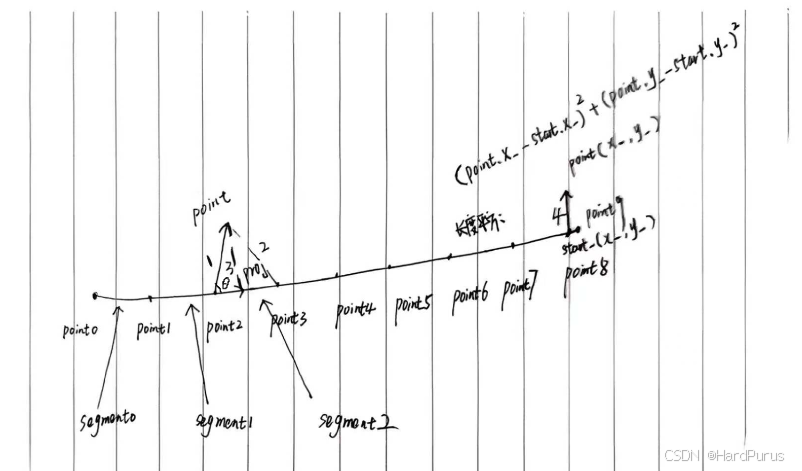
边3是垂直于segment单位向量的直线长度
const double x0 = point.x() - start_.x();
const double y0 = point.y() - start_.y();
这是在求边1,由point2指向point的向量
const double proj = x0 * unit_direction_.x() + y0 * unit_direction_.y();这是边1所表示的向量与segment单位向量的点积(内积)的代数表示,表示有向投影距离,几何表示是
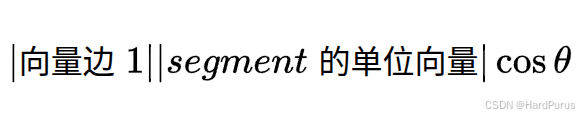
因为segment单位向量的模长为1,所以最后几何表示为
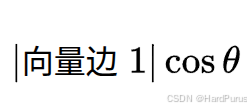
return Square(x0 * unit_direction_.y() - y0 * unit_direction_.x());上面就是在计算边1所表示的向量与segment单位向量的叉积(外积)的代数表示,几何表示就是
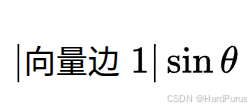
注意DistanceSquareTo获取到的距离都是没有开方的,正常计算模长是需要开方的.
如果对向量不是很熟悉的同学可以再去复习一下向量相关的知识:二维点积,叉积,投影,向量的模,向量的方向角,方向余弦.
min_dist = std::sqrt(min_dist);
  const auto &nearest_seg = segments_[min_index];
  const auto prod = nearest_seg.ProductOntoUnit(point);
  const auto proj = nearest_seg.ProjectOntoUnit(point);
  if (min_index == 0) {
    *accumulate_s = std::min(proj, nearest_seg.length());
    if (proj < 0) {
      *lateral = prod;
    } else {
      *lateral = (prod > 0.0 ? 1 : -1) * min_dist;
    }
  } else if (min_index == seg_num - 1) {
    *accumulate_s = accumulated_s_[min_index] + std::max(0.0, proj);
    if (proj > 0) {
      *lateral = prod;
    } else {
      *lateral = (prod > 0.0 ? 1 : -1) * min_dist;
    }
  } else {
    *accumulate_s = accumulated_s_[min_index] +
                    std::max(0.0, std::min(proj, nearest_seg.length()));
    *lateral = (prod > 0.0 ? 1 : -1) * min_dist;
  }
获取到自车到segment最小距离的平方后,进行开方得到最小距离,然后分三种情况计算自车在当前车道上的纵向距离和横向距离
1.如果当前车道离自车最近的segment是当前车道的第一个segment
纵向距离:segment起点指向自车位置的向量在segment单位向量方向上的投影长度,但是不能超过segment自身的长度
横向距离:分两种情况
第一种:segment起点指向自车位置的向量的投影点在当前segment起点的左侧,横向距离设置为自车位置到segment的垂直距离
第二种:segment起点指向自车位置的向量的投影点在当前segment上,横向距离使用prod来判断自车在segment的左边还是右边,prod大于0在左侧,否则在右侧,然后距离大小使用最小距离min_dist.
min_dist和prod的区别是min_dist是大小没有方向,prod是带方向的.并且这里投影在segment的起点和终点的横向距离选择策略是不同的,起点选择是垂直距离,但终点选择的则是自车到终点的直线距离
2.如果当前车道离自车最近的segment是当前车道的最后一个segment
纵向距离:就是最后一个segment之前的所有segment的累积长度加上自车在最后一个segment上的投影距离
横向距离:分两种情况
第一种是投影点在当前segment上或终点以外,则横向距离直接使用垂直距离
第二种是投影点在segment起点的左侧或正好是起点,则横向距离使用min_dist,符号用prod来判断
3.如果当前车道离自车最近的segment是在非第一个和最后一个segment上
纵向距离:最近segment之前所有segment的累积距离加上投影距离
横向距离:直接使用min_dist,方向由prod正负来判断
通过GetProjection获取自车在某一条车道的纵向距离s和横向距离l
      if (!lane->GetProjection({point.x(), point.y()}, &s, &l)) {
        continue;
      }
然后,获取车道的角度,与当前自车的航向角的角度差
如果车辆朝向与车道朝向之间的夹角差超过 270° / 2 = 135°,则跳过这个 lane(认为不可能是正确方向)。
因为:
M_PI_2= π/2 = 90°M_PI_2 * 1.5= 1.5 × 90° = 135°
所以:角度差 > 135° 就不认为这是一个可以行驶的方向。
也就是说:车辆朝向不能和车道方向差太大,否则这个车道不合理。
      double lane_heading = lane->Heading(s);
      if (std::fabs(common::math::AngleDiff(lane_heading, state.heading())) >
          M_PI_2 * 1.5) {
        continue;
      }
double AngleDiff(const double from, const double to) {
return NormalizeAngle(to - from);
}
double NormalizeAngle(const double angle) {
double a = std::fmod(angle + M_PI, 2.0 * M_PI);
if (a < 0.0) {
a += (2.0 * M_PI);
}
return a - M_PI;
}NormalizeAngle:把任意角度归一化到 [-π, π)
平移:
angle + M_PI
把原区间 [-π, π) 映射到 [0, 2π),便于取模。取模:
std::fmod(..., 2π)
将角度限制在 [−2π, 2π) 范围内(注意:fmod对负数返回负余数)。修正负余数:
如果a < 0,加上2π,使其落在 [0, 2π)。平移回原区间:
a - M_PI
最终结果 ∈ [-π, π)
下表中逆时针为正,顺时针为负
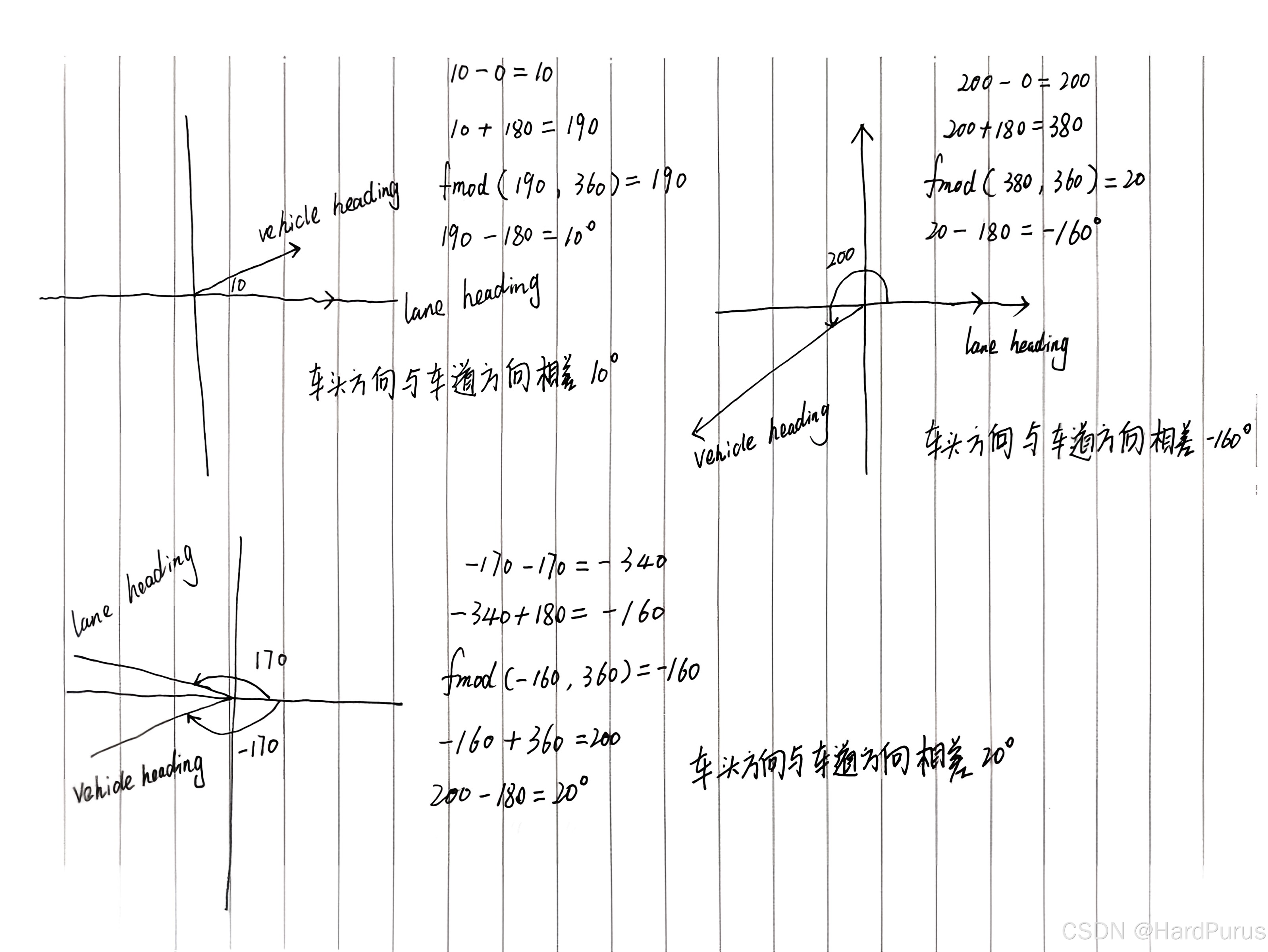
所以NormalizeAngle的作用就是把角度差限定在[-π, π)
for (const auto& lane : valid_lanes) {

   if (!lane->GetProjection({point.x(), point.y()}, &s, &l)) {
        continue;
      }

    ...

    valid_way_points.emplace_back();
    auto& last = valid_way_points.back();
    last.lane = lane;
    last.s = s;
    last.l = l;
这段就是遍历全局路线上的所有符合条件(车头方向与车道方向角度差小于阈值)的lane,并找到每条lane中离自车位置最近的segment,并获取到自车在这条lane上的投影点的纵向距离和横向距离,存储到valid_way_points中
  for (size_t i = 0; i < valid_way_points.size(); i++) {
    lane_heading = valid_way_points[i].lane->Heading(valid_way_points[i].s);
    if (std::abs(common::math::AngleDiff(lane_heading, vehicle_heading)) >
        M_PI_2 * 1.5) {
      continue;
    }
    if (std::fabs(valid_way_points[i].l) < distance) {
      distance = std::fabs(valid_way_points[i].l);
      closest_index = i;
    }
  }
  if (closest_index == -1) {
    AERROR << "Can not find nearest waypoint. vehicle heading:"
           << vehicle_heading << "lane heading:" << lane_heading;
    return false;
  }
  waypoint->lane = valid_way_points[closest_index].lane;
  waypoint->s = valid_way_points[closest_index].s;
  waypoint->l = valid_way_points[closest_index].l;
然后在遍历valid_way_points获取到横向距离最小的那个投影位置,就是GetNearestPointFromRouting函数要获取的waypoint,主要数据是哪条lane, 投影点在这条lane上的纵向距离,及自车到这条lane上的横向距离.