
1.通过外部请求routing模块进行算路
一般通过Dreamview/Dreamview Plus或planning_command脚本或task_manager模块进行算路请求
请求的channel是:/apollo/external_command/lane_follow
参数为:
message LaneFollowCommand {
  optional apollo.common.Header header = 1;
  // Unique identification for command.
  optional int64 command_id = 2 [default = -1];
  // If the start pose is set as the first point of "way_point".
  optional bool is_start_pose_set = 3 [default = false];
  // The points between "start_pose" and "end_pose".
  repeated Pose way_point = 4;
  // End pose of the lane follow command, must be given.
  required Pose end_pose = 5;
  // The lane segments which should not be passed by.
  repeated LaneSegment blacklisted_lane = 6;
  // The road which should not be passed by.
  repeated string blacklisted_road = 7;
  // Expected speed when executing this command. If "target_speed" > maximum
  // speed of the vehicle, use maximum speed of the vehicle instead. If it is
  // not given, the default target speed of system will be used.
  optional double target_speed = 8;
}
参数至少要设置command_id, end_pose
command_id:指令的唯一标识,可以设为0
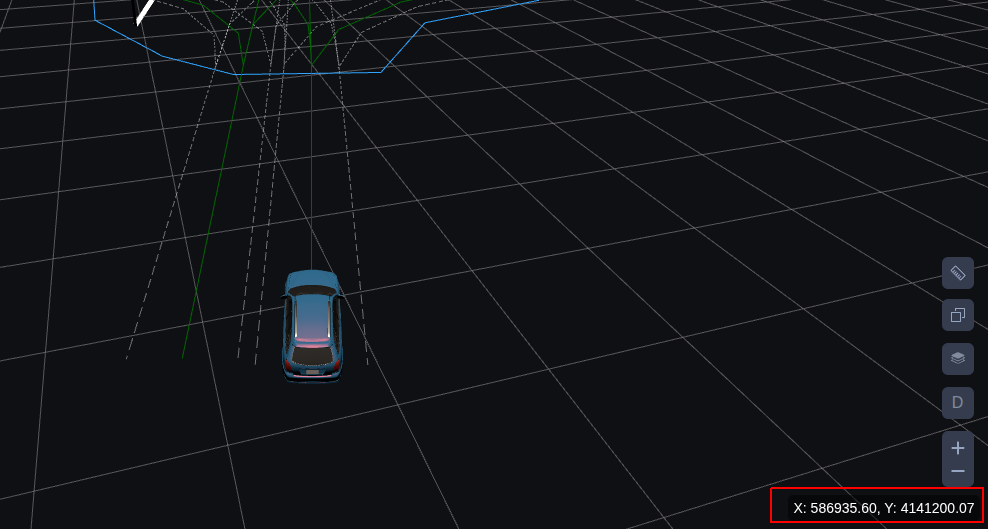
end_pose:目的地的坐标,此坐标是以自车为参考系的坐标,可以通过鼠标在Dreamview上获取
通过task_manager模块请求消息代码如下:
modules/task_manager/task_manager_component.cc
  lane_follow_command_client_ =
      node_->CreateClient<LaneFollowCommand, CommandStatus>(
          task_manager_conf.topic_config().lane_follow_command_topic());
  ... ...


  lane_follow_command_client_->SendRequest(lane_follow_command);
首先,创建lane_follow_command的client,然后中间省略部分是在获取上面介绍的LaneFollowCommand类型的数据,一般传入的就是目的地坐标,有时也会传入经由地坐标,然后通过SendRequest把请求算路的消息发出去.
因为本专栏主要介绍的是pnc的算法部分,所以对于系统流程的部分不过多介绍,大家可以自己去根据提供的代码文件阅读.
2.external_command模块负责接收外部下发算路的指令
接收函数
modules/external_command/command_processor/command_processor_base/motion_command_processor_base.h
  std::shared_ptr<cyber::Service<T, CommandStatus>> command_service_;
  command_service_ = node->CreateService<T, CommandStatus>(
      config.input_command_name(),
      [this](const std::shared_ptr<T>& command,
             std::shared_ptr<CommandStatus>& status) {
        this->OnCommand(command, status);
      });
在external_command模块中,通过Service通信方式的回调函数,接收算路请求指令,然后通过OnCommand函数对请求指令进行处理,该函数有两个参数:
command:输入参数,表示算路请求指令
status:输出参数,请求指令处理状态
接下来介绍OnCommand函数中主要处理逻辑
(1) Convert函数-构建算路请求所需的数据
modules/external_command/command_processor/lane_follow_command_processor/lane_follow_command_processor.cc
在Convert函数,分两种情况:
第一种:在算路请求指令中传入了起点坐标
第二种:在算路请求中没有传入起点坐标,这个时候会根据当前自车位置构建一个
1)算路指令中,没有设置起点坐标情况下的起点构建逻辑
首先,说一下Convert函数,最终要输出的数据的数据类型是RoutingRequest
message RoutingRequest {
  optional apollo.common.Header header = 1;
  // at least two points. The first is start point, the end is final point.
  // The routing must go through each point in waypoint.
  repeated apollo.routing.LaneWaypoint waypoint = 2;
  repeated apollo.routing.LaneSegment blacklisted_lane = 3;
  repeated string blacklisted_road = 4;
  optional bool broadcast = 5 [default = true];
  optional apollo.routing.ParkingInfo parking_info = 6 [deprecated = true];
  // If the start pose is set as the first point of "way_point".
  optional bool is_start_pose_set = 7 [default = false];
}
比较重要的成员就是waypoint,它是repeated的,相当于动态数组,它存储的数据通常是全局路线的起点终点数据,有时还会包括途径点.
message LaneWaypoint {
  optional string id = 1;
  optional double s = 2;
  optional apollo.common.PointENU pose = 3;
  // When the developer selects a point on the dreamview route editing
  // the direction can be specified by dragging the mouse
  // dreamview calculates the heading based on this to support construct lane way point with heading
  optional double heading = 4;
}
那如果算路指令中没有传入起点坐标,程序就会通过SetStartPose函数构建一个,然后存到RoutingRequest结果中的waypoint中,作为计算全局路线的起点数据
modules/external_command/command_processor/command_processor_base/motion_command_processor_base.h
bool MotionCommandProcessorBase<T>::SetStartPose(
    std::shared_ptr<apollo::routing::RoutingRequest>& routing_request) const {
  CHECK_NOTNULL(routing_request);
  // Get the current vehicle pose as start pose.
  auto start_pose = routing_request->add_waypoint();
  if (!lane_way_tool_->GetVehicleLaneWayPoint(start_pose)) {
    AERROR << "Get lane near start pose failed!";
    return false;
  }
  return true;
}
在GetVehicleLaneWayPoint函数中首先是从location模块获取自车坐标(x, y, heading)此坐标是基于自车坐标系也就是以后轴中心为原心的坐标
bool LaneWayTool::GetVehicleLaneWayPoint(
    apollo::routing::LaneWaypoint *lane_way_point) const {
  CHECK_NOTNULL(lane_way_point);
  // Get the current localization pose
  auto *localization =
      message_reader_->GetMessage<apollo::localization::LocalizationEstimate>(
          FLAGS_localization_topic);
  if (nullptr == localization) {
    AERROR << "Cannot get vehicle location!";
    return false;
  }
  external_command::Pose pose;
  pose.set_x(localization->pose().position().x());
  pose.set_y(localization->pose().position().y());
  pose.set_heading(localization->pose().heading());
  return ConvertToLaneWayPoint(pose, lane_way_point);
}
ConvertToLaneWayPoint函数中分两个逻辑:
一个是如果pose中包含heading
另一个是不包含heading
pose中包含heading的情况,匹配距离自车最近的车道
modules/map/hdmap/hdmap_impl.cc
GetNearestLaneWithHeading函数
在GetLanesWithHeading中,首先通过GetLanes函数,以当前自车位置为圆心,指定范围为半径,从map模块通过KDTree(不在pnc算法解析范围)算法检索范围内所有车道,然后
条件1:检查自车位置到投影点距离是否在半径范围内
条件2还要检查车道朝向与车头朝向角度差是否在一定阈值范围内
  for (auto& lane : all_lanes) {
    Vec2d proj_pt(0.0, 0.0);
    double s_offset = 0.0;
    int s_offset_index = 0;
    double dis = lane->DistanceTo(point, &proj_pt, &s_offset, &s_offset_index);
  }
double dis = lane->DistanceTo(point, &proj_pt, &s_offset, &s_offset_index);
dis:自车位置到车道上投影点距离
point:自车坐标
proj_pt:自车在车道上投影点的坐标
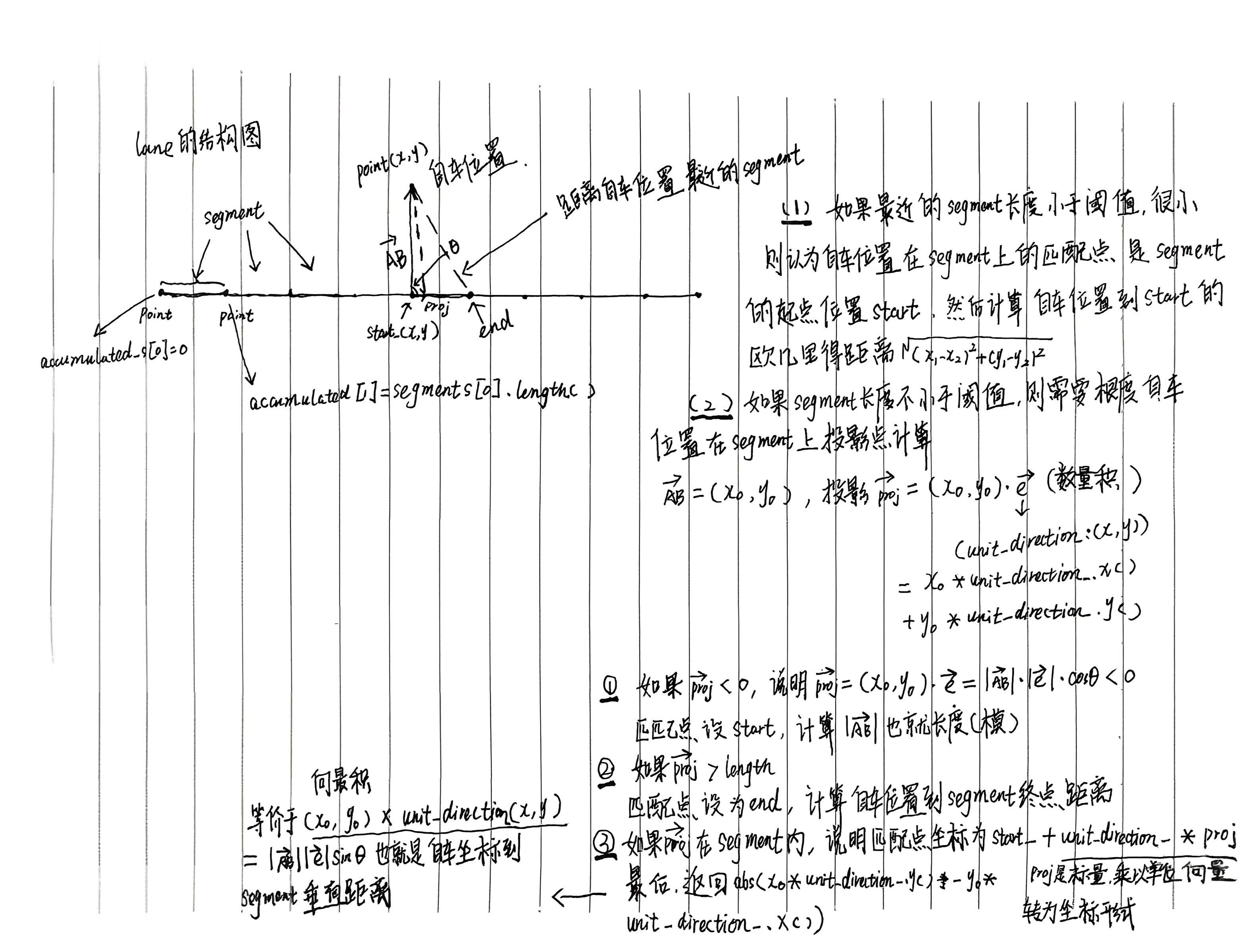
s_offset:投影点在当前车道上的累积纵向距离也就是说,是从这根车道的起点开始计算的累计纵向距离,根据下面图示可以看到lane的结构图,一根lane由若干point构成,两个point构成一段segment.
s_offset_index:离自车位置最近的segment是车道上的第几个segment的索引
modules/common/math/line_segment2d.cc
LineSegment2d::DistanceTo函数的具体实现说明
检查车道朝向与车头朝向角度差是否在一定阈值范围内
    if (dis <= distance) {
      double heading_diff =
          fabs(lane->headings()[s_offset_index] - central_heading);
      if (fabs(apollo::common::math::NormalizeAngle(heading_diff)) <=
          max_heading_difference) {
        lanes->push_back(lane);
      }
    }
lane->headings()[s_offset_index]:当前segment段的车道朝向
central_heading:当前车头朝向
double NormalizeAngle(const double angle) {
  double a = std::fmod(angle + M_PI, 2.0 * M_PI);
  if (a < 0.0) {
    a += (2.0 * M_PI);
  }
  return a - M_PI;
}
确保输出角度在 [−π,π]弧度范围内,这也是角度差的取值范围
获取到所有符合上面两个条件的lane后,就找到距离自车位置最近的那段segment
  for (const auto& lane : lanes) {
    double s_offset = 0.0;
    int s_offset_index = 0;
    double distance =
        lane->DistanceTo(point, &map_point, &s_offset, &s_offset_index);
    if (distance < min_distance) {
      min_distance = distance;
      *nearest_lane = lane;
      s = s_offset;
      s_index = s_offset_index;
    }
  }
然后通过最近的那段segment的起点指向自车位置的向量,与最近这段segment的单位向量的叉积(向量积),就可以求出自车位置点到线段segment的有向距离,如果为正,表示自车在车道左侧,负表示自车在车道右侧
  *nearest_l =
      segment_2d.unit_direction().CrossProd(point - segment_2d.start());
pose中不包含heading的情况,匹配距离自车最近的车道
GetNearestLane函数
与GetNearestLaneWithHeading的不同就是没有半径距离和车道朝向与自车车头朝向角度差的条件限制
int HDMapImpl::GetNearestLane(const Vec2d& point,
                              LaneInfoConstPtr* nearest_lane, double* nearest_s,
                              double* nearest_l) const {
  CHECK_NOTNULL(nearest_lane);
  CHECK_NOTNULL(nearest_s);
  CHECK_NOTNULL(nearest_l);
  const auto* segment_object = lane_segment_kdtree_->GetNearestObject(point);
  if (segment_object == nullptr) {
    return -1;
  }
  const Id& lane_id = segment_object->object()->id();
  *nearest_lane = GetLaneById(lane_id);
  ACHECK(*nearest_lane);
  const int id = segment_object->id();
  const auto& segment = (*nearest_lane)->segments()[id];
  Vec2d nearest_pt;
  segment.DistanceTo(point, &nearest_pt);
  *nearest_s = (*nearest_lane)->accumulate_s()[id] +
               nearest_pt.DistanceTo(segment.start());
  *nearest_l = segment.unit_direction().CrossProd(point - segment.start());

  return 0;
}
因为距离自车最近的车道nearest_lane已经通过函数GetNearestLaneWithHeading/GetNearestLane找到了,投影点在当前车道的纵向距离nearest_s也求出来了,
int HDMapImpl::GetNearestLaneWithHeading(
    const Vec2d& point, const double distance, const double central_heading,
    const double max_heading_difference, LaneInfoConstPtr* nearest_lane,
    double* nearest_s, double* nearest_l)
lane_way_point->set_id(nearest_lane->id().id());
lane_way_point->set_s(nearest_s);
auto *lane_way_pose = lane_way_point->mutable_pose();
lane_way_pose->set_x(pose.x());
lane_way_pose->set_y(pose.y());这样LaneWaypoint类型的起点信息就构建完成了
本专栏只考虑public_road的场景不考虑停车场景,所以lane_way_tool->IsParkandgoScenario()内的逻辑不考虑
下面的逻辑是构造完起点的LaneWaypoint类型后,就使用上面构造起点相同的方式去构建途径点和目的地的LaneWaypoint类型数据
for (const auto& way_point : command->way_point()) {
    if (!lane_way_tool->ConvertToLaneWayPoint(
            way_point, routing_request->add_waypoint())) {
      AERROR << "Cannot convert the end pose to lane way point: "
             << way_point.DebugString();
      return false;
    }
  }
  // Get the end pose and update in RoutingRequest.
  if (!lane_way_tool->ConvertToLaneWayPoint(command->end_pose(),
                                            routing_request->add_waypoint())) {
    AERROR << "Cannot convert the end pose to lane way point: "
           << command->end_pose().DebugString();
    return false;
  }