
planning模块(11)-路径规划优化算法(piecewise jerk path optimizer) 上一篇已经详细介绍过piecewise jerk path optimizer算法
bool res_opt = PathOptimizerUtil::OptimizePath(
        init_sl_state_, end_state, ref_l, weight_ref_l, path_boundary,
        ddl_bounds, jerk_bound, config, &opt_l, &opt_dl, &opt_ddl);
优化后,得到自车沿参考线方向上的优化后的(l, l', l'')
ToPiecewiseJerkPath函数
PiecewiseJerkTrajectory1d piecewise_jerk_traj(x.front(), dx.front(),
                                                ddx.front());
PiecewiseJerkTrajectory1d::PiecewiseJerkTrajectory1d(const double p,
                                                     const double v,
                                                     const double a) {
  last_p_ = p;
  last_v_ = v;
  last_a_ = a;
  param_.push_back(0.0);
}
  for (std::size_t i = 1; i < x.size(); ++i) {
    const auto dddl = (ddx[i] - ddx[i - 1]) / delta_s;
    piecewise_jerk_traj.AppendSegment(dddl, delta_s);
  }
使用有限差分计算jerk
AppendSegment函数
void PiecewiseJerkTrajectory1d::AppendSegment(const double jerk,
                                              const double param) {
  CHECK_GT(param, FLAGS_numerical_epsilon);

  param_.push_back(param_.back() + param);

  segments_.emplace_back(last_p_, last_v_, last_a_, jerk, param);

  last_p_ = segments_.back().end_position();

  last_v_ = segments_.back().end_velocity();

  last_a_ = segments_.back().end_acceleration();
}
首先,上一篇优化,是对路径边界进行采样之后,按照每个采样点进行优化的,所以AppendSegment是在按照采样点进行分段.
param_:存的是每段的累积长度
  while (accumulated_s < piecewise_jerk_traj.ParamLength()) {
    double l = piecewise_jerk_traj.Evaluate(0, accumulated_s);
    double dl = piecewise_jerk_traj.Evaluate(1, accumulated_s);
    double ddl = piecewise_jerk_traj.Evaluate(2, accumulated_s);

    common::FrenetFramePoint frenet_frame_point;
    frenet_frame_point.set_s(accumulated_s + start_s);
    frenet_frame_point.set_l(l);
    frenet_frame_point.set_dl(dl);
    frenet_frame_point.set_ddl(ddl);
    frenet_frame_path.push_back(std::move(frenet_frame_point));

    accumulated_s += FLAGS_trajectory_space_resolution;
  }

  return FrenetFramePath(std::move(frenet_frame_path));
}
重新进行采样,FLAGS_trajectory_space_resolution默认是1m
ConstantJerkTrajectory1d::Evaluate函数
double ConstantJerkTrajectory1d::Evaluate(const std::uint32_t order,
                                          const double param)
order:阶数
0:表示横向位置l
1:表示横向速度l'
2:表示横向加速度l''
在调用函数AppendSegment我们设置了每一段的jerk值
double ConstantJerkTrajectory1d::Evaluate(const std::uint32_t order,
                                          const double param) const {
  switch (order) {
    case 0: {
      return p0_ + v0_ * param + 0.5 * a0_ * param * param +
             jerk_ * param * param * param / 6.0;
    }
    case 1: {
      return v0_ + a0_ * param + 0.5 * jerk_ * param * param;
    }
    case 2: {
      return a0_ + jerk_ * param;
    }
    case 3: {
      return jerk_;
    }
    default:
      return 0.0;
  }
}
上面的case就是阶数order对应的处理逻辑
p0_:规划起点的l
v0_:规划起点的l'
a0_:规划起点的l''
jerk_是通过l''的有限差分计算出来的,并通过AppendSegment函数设置的
已知p'''(s) = j(j表示jerk)
case 3时
直接返回jerk
case 2时
p'''(s) = j
对两边积分
\int p'''(s)ds= \int j ds
得到p''(s)=js + C_{1}
当s=0带入
p''(0)=j \cdot 0 + C_{1} = C_{1}
已知
p''(0) = a_{0}
C_{1} = a_{0}
得到case 2的公式:p''(s) = a_{0} + js
case 1时
对p''(s) = a_{0} + js两边积分
\int p''(s) ds = \int (a_{0} + js) ds
p'(s) = a_{0}s + \frac{1}{2}js^{2}+C_{2}
p'(0)=C_{2}=v_{0}
得到case 1的公式:p'(s)=v_{0}+a_{0}s+\frac{1}{2}js^{2}
case 0时
对p'(s)=v_{0}+a_{0}s+\frac{1}{2}js^{2}两边积分
\int p'(s)ds=\int (v_{0}+a_{0}s+\frac{1}{2}js^{2})ds
得到p(s) = v_0s + \frac{1}{2}a_{0}s^{2}+\frac{1}{6}js^{3}+C_{3}
p(0)=C_{3}=p_{0}
得到case 0的公式:p(s) = p_{0}+v_0s + \frac{1}{2}a_{0}s^{2}+\frac{1}{6}js^{3}
ConstantJerkTrajectory1d::Evaluate函数的逻辑就分析完了
接下来继续分析PiecewiseJerkTrajectory1d::Evaluate函数
PiecewiseJerkTrajectory1d::Evaluate函数
std::vector<common::FrenetFramePoint> frenet_frame_path;
  double accumulated_s = 0.0;
  while (accumulated_s < piecewise_jerk_traj.ParamLength()) {
    double l = piecewise_jerk_traj.Evaluate(0, accumulated_s);
    double dl = piecewise_jerk_traj.Evaluate(1, accumulated_s);
    double ddl = piecewise_jerk_traj.Evaluate(2, accumulated_s);

		...

	accumulated_s += FLAGS_trajectory_space_resolution;
piecewise_jerk_traj.ParamLength():可以理解为是原来路径边界采样点的总长度
accumulated_s:是新的采样点累积长度
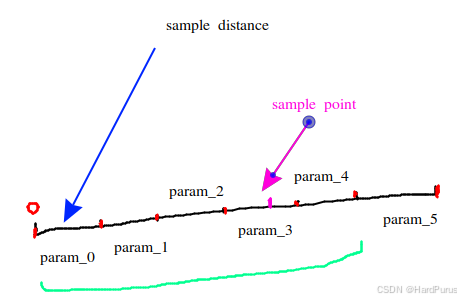
double PiecewiseJerkTrajectory1d::Evaluate(const std::uint32_t order,
                                           const double param) const {
  auto it_lower = std::lower_bound(param_.begin(), param_.end(), param);

  if (it_lower == param_.begin()) {
    return segments_[0].Evaluate(order, param);
  }

  if (it_lower == param_.end()) {
    auto index = std::max(0, static_cast<int>(param_.size() - 2));
    return segments_.back().Evaluate(order, param - param_[index]);
  }

  auto index = std::distance(param_.begin(), it_lower);
  return segments_[index - 1].Evaluate(order, param - param_[index - 1]);
}
如果新采样点在param_0这段上,则使用第一段的(l, l', l'')及采样距离作为上面推导的公式中的s计算新采样点的(l, l', l'')
如果新采样点超过了param_5这段,则使用最后一段的(l, l', l'')及采样距离与绿色段长度的偏移作为上面推导的公式中的s计算新采样点的(l, l', l'')
如果新采样点在粉色位置,则使用param_2的(l, l', l'')及采样距离与param_2累积长度的偏移作为上面推导的公式中的s计算新采样点的(l, l', l'').
    common::FrenetFramePoint frenet_frame_point;
    frenet_frame_point.set_s(accumulated_s + start_s);
    frenet_frame_point.set_l(l);
    frenet_frame_point.set_dl(dl);
    frenet_frame_point.set_ddl(ddl);
    frenet_frame_path.push_back(std::move(frenet_frame_point));
用新的采样数据构建FrenetFramePoint
到这ToPiecewiseJerkPath函数就介绍完了
PathData path_data;
      path_data.SetReferenceLine(&reference_line);
      path_data.SetFrenetPath(std::move(frenet_frame_path));
...
path_data.set_path_label(path_boundary.label());
      path_data.set_blocking_obstacle_id(path_boundary.blocking_obstacle_id());
      candidate_path_data->push_back(std::move(path_data));
构建PathData数据
SetFrenetPath函数
for (const common::FrenetFramePoint &frenet_point : frenet_path) {
    const common::SLPoint sl_point =
        PointFactory::ToSLPoint(frenet_point.s(), frenet_point.l());
    common::math::Vec2d cartesian_point;
    if (!reference_line_->SLToXY(sl_point, &cartesian_point)) {
      AERROR << "Fail to convert sl point to xy point";
      return false;
    }
}
SLToXY函数
bool ReferenceLine::SLToXY(const SLPoint& sl_point,
                           common::math::Vec2d* const xy_point) const {
  if (map_path_.num_points() < 2) {
    AERROR << "The reference line has too few points.";
    return false;
  }

  const auto matched_point = GetReferencePoint(sl_point.s());
  const auto angle = common::math::Angle16::from_rad(matched_point.heading());
  xy_point->set_x(matched_point.x() - common::math::sin(angle) * sl_point.l());
  xy_point->set_y(matched_point.y() + common::math::cos(angle) * sl_point.l());
  return true;
}
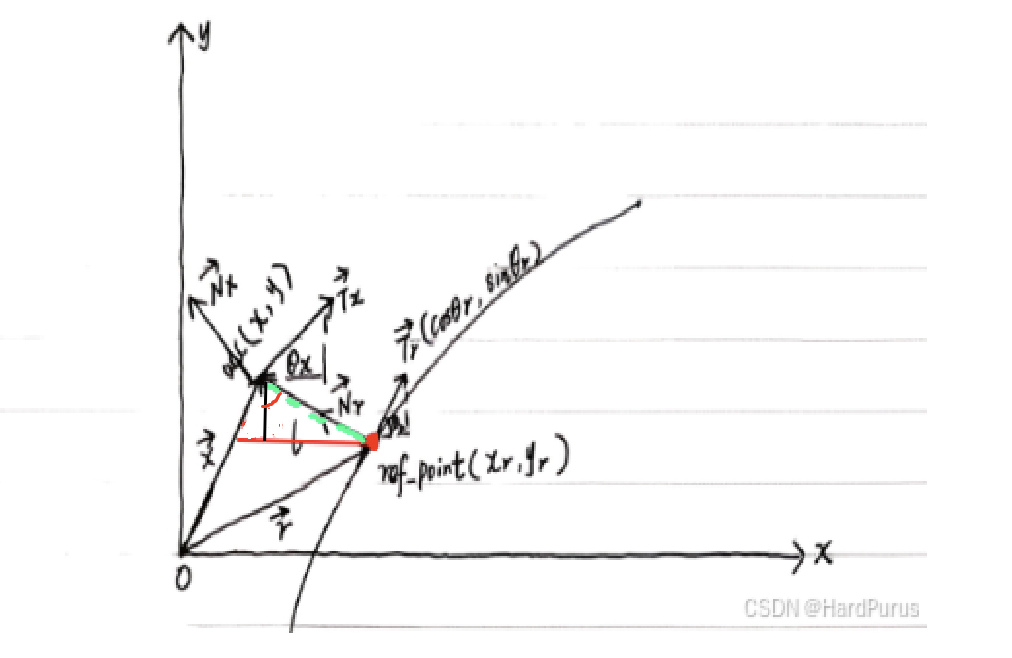
首先,会通过路径点的s值获取到参考线上所对应的匹配点如上图红色点
angle:可以理解为是匹配点在参考线上切线方向与x轴的夹角(可以理解为上图\vec{T_{r}})与x轴的夹角\theta_{r},可以回看planning模块(5)-参考线的平滑 回顾一下set_heading
匹配点的笛卡尔坐标是(x_{r}, y_{r}),这里可以理解为自车与匹配点的连线(上图绿色线)与\vec{T_{r}}是垂直的,并且红色夹角也是\theta_{r}
这样,当前路径点(s, l)转换为笛卡尔坐标系的(x,y)的公式如下:
x = x_{r} - l \times \sin(angle)
y = y_{r} + l \times \cos(angle)
CalculateTheta函数
double CartesianFrenetConverter::CalculateTheta(const double rtheta,
                                                const double rkappa,
                                                const double l,
                                                const double dl) {
  return NormalizeAngle(rtheta + std::atan2(dl, 1 - l * rkappa));
}
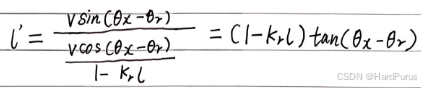
根据planning模块-笛卡尔坐标转Frenet坐标 计算出的l',我们可以通过这个公式推导出\theta_{x}的计算公式
\theta_{x} = \arctan(\frac{l'}{1-k_{r}l}) + \theta_{r}
这就是CalculateTheta函数的计算过程,NormalizeAngle是将角度限定在(-\pi, \pi]
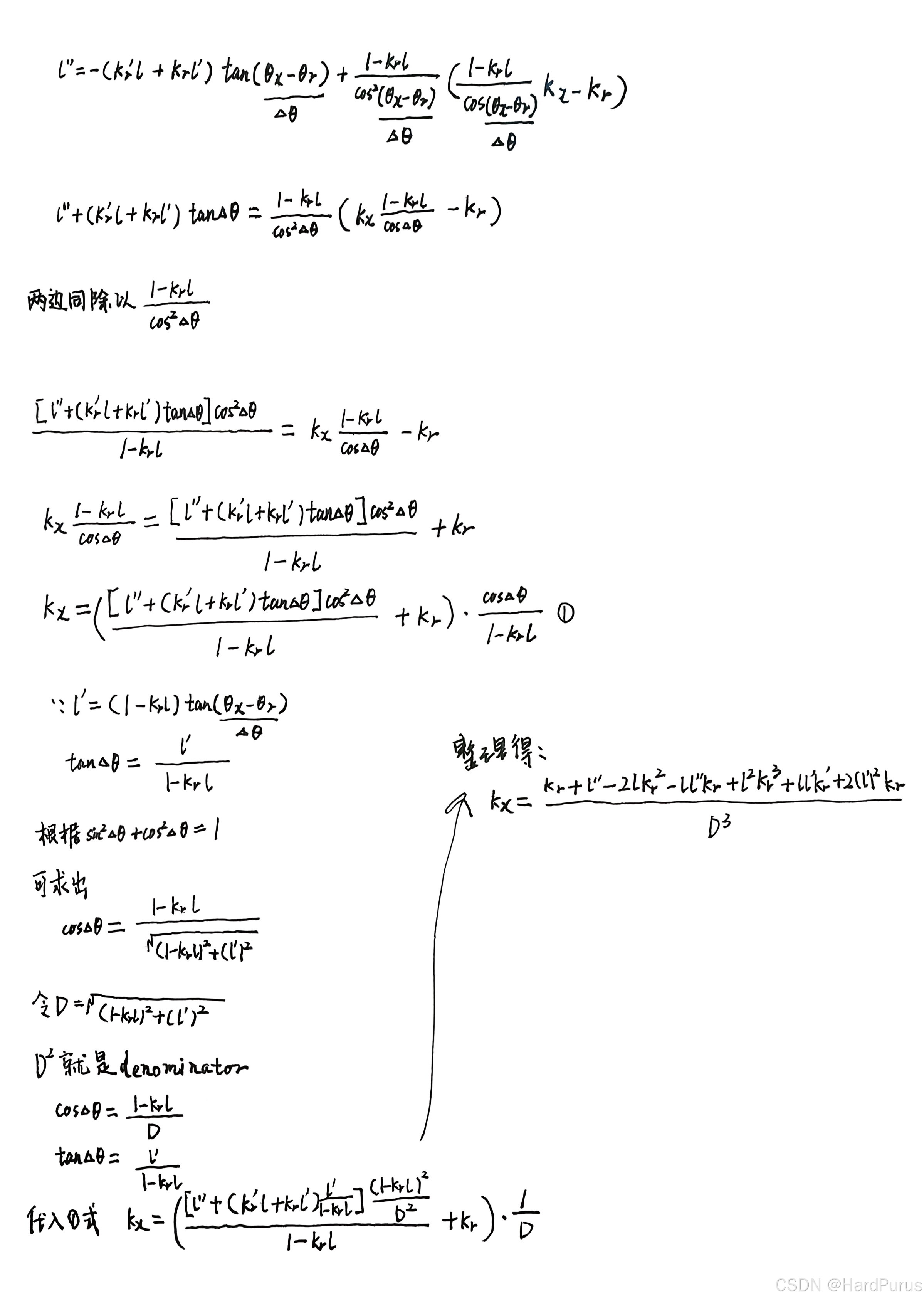
上面推导逻辑对应代码
double denominator = (dl * dl + (1 - l * rkappa) * (1 - l * rkappa));
denominator是D^2
denominator = std::pow(denominator, 1.5);
denominator是D^3
const double numerator = rkappa + ddl - 2 * l * rkappa * rkappa -
l * ddl * rkappa + l * l * rkappa * rkappa * rkappa + l * dl * rdkappa + 2 * dl * dl * rkappa;
numerator是k_{x}的分子
return numerator / denominator;
返回的是k_{x}
path_points.push_back(PointFactory::ToPathPoint(cartesian_point.x(),
cartesian_point.y(), 0.0, s,theta, kappa, dkappa));
  static inline PathPoint ToPathPoint(const double x, const double y,
  const double z = 0, const double s = 0,
  const double theta = 0,
  const double kappa = 0,
  const double dkappa = 0,
  const double ddkappa = 0)
用计算出来的笛卡尔坐标系下的数据构建ToPathPoint类型数据,第一个点的纵向距离s为0,曲率的变化率为0
if (!path_points.empty()) {
  common::math::Vec2d last = PointFactory::ToVec2d(path_points.back());
  const double distance = (last - cartesian_point).Length();
  s = path_points.back().s() + distance;
  dkappa = (kappa - path_points.back().kappa()) / distance;
}
之后的点的纵向距离是通过前一个点的纵向距离加上当前点与上一个点的欧几里德距离,曲率变化率由dkappa的计算方式近似得出.
*discretized_path = DiscretizedPath(std::move(path_points));
DiscretizedPath::DiscretizedPath(std::vector<PathPoint> path_points)
    : std::vector<PathPoint>(std::move(path_points)) {}
将所有计算出的路径点数据,存入DiscretizedPath类中.
到这LaneFollowPath::OptimizePath函数就介绍完了
AssessPath函数
IsValidRegularPath函数
IsGreatlyOffReferenceLine函数
bool PathAssessmentDeciderUtil::IsGreatlyOffReferenceLine(
    const PathData& path_data) {
  static constexpr double kOffReferenceLineThreshold = 20.0;
  const auto& frenet_path = path_data.frenet_frame_path();
  for (const auto& frenet_path_point : frenet_path) {
    if (std::fabs(frenet_path_point.l()) > kOffReferenceLineThreshold) {
      AINFO << "Greatly off reference line at s = " << frenet_path_point.s()
            << ", with l = " << frenet_path_point.l();
      return true;
    }
  }
  return false;
}
检查生成的路径是否在横向上严重偏离了参考线
IsGreatlyOffRoad函数
bool PathAssessmentDeciderUtil::IsGreatlyOffRoad(
    const ReferenceLineInfo& reference_line_info, const PathData& path_data) {
  static constexpr double kOffRoadThreshold = 10.0;
  const auto& frenet_path = path_data.frenet_frame_path();
  for (const auto& frenet_path_point : frenet_path) {
    double road_left_width = 0.0;
    double road_right_width = 0.0;
    if (reference_line_info.reference_line().GetRoadWidth(
            frenet_path_point.s(), &road_left_width, &road_right_width)) {
      if (frenet_path_point.l() > road_left_width + kOffRoadThreshold ||
          frenet_path_point.l() < -road_right_width - kOffRoadThreshold) {
        AINFO << "Greatly off-road at s = " << frenet_path_point.s()
              << ", with l = " << frenet_path_point.l();
        return true;
      }
    }
  }
  return false;
}
检查生成的路径是否严重偏离了物理道路边界
IsStopOnReverseNeighborLane函数
if (path_data.path_label().find("left") == std::string::npos &&
      path_data.path_label().find("right") == std::string::npos) {
    return false;
  }
一般会生成多条候选路径,并给它们贴上标签,比如 "self"(原车道)、"left"(向左借道/变道)、"right"(向右借道/变道)
如果这条路径既不是向左偏,也不是向右偏,说明它是在当前车道内行驶.既然没离开原车道,也就不可能停在对向邻近车道,因此直接返回 false,不做后续检查.
  std::vector<common::SLPoint> all_stop_point_sl =
      reference_line_info.GetAllStopDecisionSLPoint();
  if (all_stop_point_sl.empty()) {
    return false;
  }
检查决策层是否下达了“停止”指令
  for (const auto& stop_point_sl : all_stop_point_sl) {
    if (stop_point_sl.s() - adc_end_s < kLookForwardBuffer) {
      continue;
    }
    check_s = stop_point_sl.s();
    break;
  }
  if (check_s <= 0.0) {
    return false;
  }
获取离自车车头最远的停止点
static constexpr double kSDelta = 0.3;
  common::SLPoint path_point_sl;
  for (const auto& frenet_path_point : path_data.frenet_frame_path()) {
    if (std::fabs(frenet_path_point.s() - check_s) < kSDelta) {
      path_point_sl.set_s(frenet_path_point.s());
      path_point_sl.set_l(frenet_path_point.l());
    }
  }
从已经生成的路径path_data中获取到check_s位置停止点对应的sl
if (path_data.path_label().find("left") != std::string::npos &&
      path_point_sl.l() > lane_left_width) {
    if (reference_line_info.GetNeighborLaneInfo(
            ReferenceLineInfo::LaneType::LeftForward, path_point_sl.s(),
            &neighbor_lane_id, &neighbor_lane_width)) {
      AINFO << "stop path point at LeftForward neighbor lane["
            << neighbor_lane_id.id() << "]";
      return false;
    } else {
      AINFO << "stop path point at LeftReverse neighbor lane";
      return true;
    }
  }
如果向左借道,需要判断左侧车道是否是同向车道,如果是同向车道返回false,否则说明左侧没有同向车道返回true
else if (path_data.path_label().find("right") != std::string::npos &&
             path_point_sl.l() < -lane_right_width) {
    if (reference_line_info.GetNeighborLaneInfo(
            ReferenceLineInfo::LaneType::RightForward, path_point_sl.s(),
            &neighbor_lane_id, &neighbor_lane_width)) {
      AINFO << "stop path point at RightForward neighbor lane["
            << neighbor_lane_id.id() << "]";
      return false;
    } else {
      AINFO << "stop path point at RightReverse neighbor lane";
      return true;
    }
  }
如果向右借道,需要判断右侧车道是否是同向车道,如果是同向车道返回false,否则说明右侧没有同向车道返回true
到这IsValidRegularPath函数中的函数函数就介绍完了
InitPathPointDecision函数
void PathAssessmentDeciderUtil::InitPathPointDecision(
    const PathData& path_data, const PathData::PathPointType type,
    std::vector<PathPointDecision>* const path_point_decision)
path_data:生成的路径数据
type:
| 枚举项 | 含义 | 场景描述 | 决策后果 |
|---|---|---|---|
IN_LANE |
车道内 | 路径点完全处于当前行驶车道的左右边界内 | 安全,最优状态.规划与控制的首选目标 |
OUT_ON_FORWARD_LANE |
在同向邻道上 | 车辆压过车道线,但进入的是同向行驶的相邻车道 | 允许通常发生在合法换道或借道绕障过程中 |
OUT_ON_REVERSE_LANE |
在逆向车道上 | 车辆压过道路中线,进入对向行驶车道 | 高风险 / 严格限制仅在必要绕障且确认对向无车时短暂允许,绝不允许长期停留或停车 |
OFF_ROAD |
在路外 | 车辆驶离所有合法车道边界,可能压到路缘草地或人行道 | 极度危险 / 禁止。除紧急避险外,通常直接判为非法路径 |
UNKNOWN |
未知状态 | 地图数据缺失、定位丢失,或处于无法准确判定的复杂区域(如异常路口) | 保守决策通常触发减速、停车或重新规划逻辑 |
path_point_decision:包含决策信息的路径点
using PathPointDecision = std::tuple<double, PathData::PathPointType, double>;
主要包括路径点的纵向距离,决策类型,离最近障碍物的距离
curr_path_data.SetPathPointDecisionGuide(std::move(path_decision));
reference_line_info_->MutableCandidatePathData()->push_back(*final_path);
设置路径数据到reference_line_info_
reference_line_info_->SetBlockingObstacle(
      curr_path_data.blocking_obstacle_id());
设置占用了车道的静态障碍物id到reference_line_info_
到这LaneFollowPath::Process函数就介绍完了
整个路径规划的流程也介绍完了,到这task LANE_FOLLOW_PATH也介绍完了.